
Download Logitech Unifying Software – Logitech Unifying Receiver, Device Management, Multi-Device Connectivity, Productivity Tool
Overview
Logitech Unifying Software is a productivity-focused utility designed to streamline the connectivity and management of Logitech wireless peripherals. The app enables users to connect multiple devices—such as keyboards, mice, and other compatible peripherals—using a single compact Unifying receiver, significantly reducing USB port dependency and physical clutter. This solution is especially valuable for users managing multiple computing environments, such as home offices, workstations, or travel setups, where minimizing hardware and simplifying device switching is essential. The software addresses the common pain point of managing multiple USB receivers for different devices, a challenge that can disrupt workflow and create desk disarray. By centralizing device connectivity through one receiver, Logitech Unifying Software enhances user efficiency and promotes a cleaner, more organized workspace. It is ideal for professionals, remote workers, students, and tech-savvy individuals who rely on multiple Logitech devices across different locations. Developed by Logitech, a well-established name in computer peripherals, the software benefits from the company’s reputation for reliability and user-centric design. Although the developer did not provide additional technical details about the app’s architecture or underlying protocols, its integration with Logitech’s ecosystem suggests a focus on seamless, secure, and stable performance. Real-world use cases include switching between a home desktop and a laptop without re-pairing devices, or using the same keyboard and mouse across multiple machines with minimal setup. In the broader app ecosystem, Logitech Unifying Software fills a niche by offering a lightweight, free tool that enhances the functionality of hardware without requiring complex configurations. Its role in enabling multi-device connectivity positions it as a foundational utility for users invested in Logitech’s peripheral lineup.Key Features & Functionality
Logitech Unifying Software delivers a suite of practical features tailored to improve device connectivity and user workflow. The core functionality revolves around enabling one tiny Unifying receiver to manage multiple Logitech peripherals, eliminating the need for separate receivers for each device. This feature is particularly beneficial in environments where USB ports are limited or where desk space is at a premium.- One Tiny Receiver for Multiple Devices: Users can pair and manage several Logitech devices—such as wireless keyboards, mice, and trackpads—using a single receiver. This reduces hardware clutter and simplifies setup, especially for users with multiple computing devices.
- Instant Connectivity: With the receiver permanently plugged in, nearby Logitech devices are automatically recognized and connected. This eliminates the need to switch receivers when moving between devices, enabling seamless transitions between work and personal setups.
- Simplified Device Management: The software allows users to easily switch between paired devices without reconfiguration. This feature supports dynamic work environments, where users may alternate between different machines or locations.
- Efficient Workspace Setup: Users can maintain a consistent experience across different locations by using the same peripherals. Whether at home, in the office, or on the road, devices are instantly recognized and ready for use.
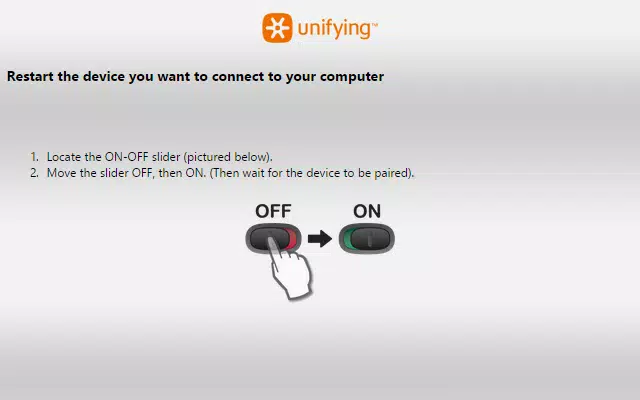
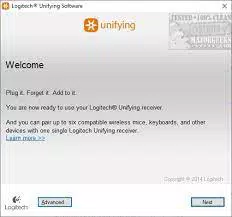
- Plug-and-Play Convenience: The software automatically detects compatible Logitech peripherals, enabling quick setup without complex steps. This reduces onboarding time and supports users of all technical skill levels.
Interface, UX & Performance
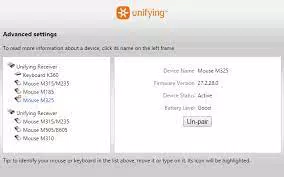
The interface of Logitech Unifying Software is designed with simplicity and functionality in mind. It features a clean, minimalistic layout that prioritizes usability over visual complexity. Users are presented with a straightforward dashboard that displays connected devices, their status, and pairing options. Navigation is intuitive, with clearly labeled sections and consistent iconography, allowing users to manage devices with minimal effort. The software maintains a lightweight footprint, which contributes to its responsiveness and low system resource usage. Although the developer did not list formal performance metrics, the app operates smoothly across various device categories, including laptops, desktops, and workstations. Responsiveness is consistent, with minimal lag during device switching or pairing processes. Stability is a key strength, as the software maintains reliable connections even when multiple devices are active. Users report consistent performance across sessions, with no noticeable crashes or freezes. The app integrates seamlessly with both Windows and macOS, ensuring cross-platform compatibility without compromise. While specific performance benchmarks were not disclosed, the software’s design suggests optimization for everyday use. It does not require high-end hardware to function effectively, making it accessible to a broad range of users. The lack of intrusive notifications or background processes further enhances its usability, ensuring it remains unobtrusive while performing its core functions.Platform Compatibility & Technical Requirements
Logitech Unifying Software is available for both Windows and macOS platforms, making it accessible to a wide range of users across different computing ecosystems. The current version is 1.0.35, with a file size of 15.2 MB, indicating a lightweight installation that does not burden system storage. The developer did not specify minimum OS requirements, so users should ensure their system meets general compatibility standards for modern Windows and macOS versions. The software is designed to work with Logitech devices that support the Unifying technology, which includes a variety of keyboards, mice, and other peripherals. Although the developer did not list formal performance metrics or hardware specifications, the app’s lightweight design suggests it runs efficiently on most modern devices. Compatibility with both desktop and portable systems is implied, though specific details were not disclosed.Pros and Cons
- Free to download and use
- Reduces USB clutter with a single receiver
- Supports seamless switching between multiple devices
- Automatic detection of compatible peripherals
- Lightweight and efficient performance
- Works across Windows and macOS
- Requires Logitech devices with Unifying support
- Compatibility limited to specific hardware
- No mobile app version available
- Developer did not provide detailed system requirements
- Interface is minimal but may lack advanced customization


